Best Halloween Templates – Free Pintables Halloween Flyers

10+ Halloween Templates, Flyers, Party Invitations & More
Spooky season is officially here, and whether you are hosting a corporate costume party, teaching a classroom full of excited students, or pitching a seasonal marketing campaign, your presentation needs to match the vibe.
For busy presenters and non-designers, creating a Halloween-themed slide deck from scratch often turns into a nightmare of tweaking color palettes and hunting down transparent graphics. To save you hours of frustrating formatting, the presentation experts at SlideChef have scoured the web to curate the ultimate list of the best free Halloween templates. From creepy and atmospheric corporate designs to playfully cute educational layouts, here are our top picks ready to download for PowerPoint, Google Slides, and Canva.
Why Use a Pre-Designed Free Halloween Template?
Creating a themed presentation from scratch often turns into a time-consuming nightmare of tweaking graphics and adjusting layouts. Using a pre-designed Halloween template provides a direct shortcut to a polished, professional deck.
- Saves Time: Skip the formatting struggle and focus on your content. Building a presentation is about delivering your core message, not spending hours hunting for transparent bat and spiderweb graphics. Pre-made templates handle the structural heavy lifting, allowing you to just drop in your text and present.
- Sets the Mood: Instantly grabs audience attention with professionally paired color palettes (deep purples, neon greens, classic orange/black) and typography. Expert designers know how to balance the holiday theme without making the slides look chaotic, ensuring your aesthetic captures the spooky spirit immediately.
- Cross-Platform Flexibility: Easily switch between Microsoft, Google, and Canva depending on your team’s workflow. Whether your office uses PowerPoint, your classroom relies on Google Slides, or your design agency prefers Canva, these templates are highly adaptable. You can download the core file and upload it directly into your preferred platform without breaking the original formatting.
Top Free Halloween Templates for PowerPoint & Google Slides
When working within Microsoft PowerPoint or Google Slides, you need templates that offer deep customization without breaking your core layout. For users firmly planted in the Microsoft and Google ecosystems, the following free options perfectly balance a spooky aesthetic with functional, professional design. We have prioritized SlideChef’s own highly structured, event-ready layouts first, followed by the most reliable generic themes available across the web.
Jack O’ Lanterns Halloween Template – Halloween Google Slides Template
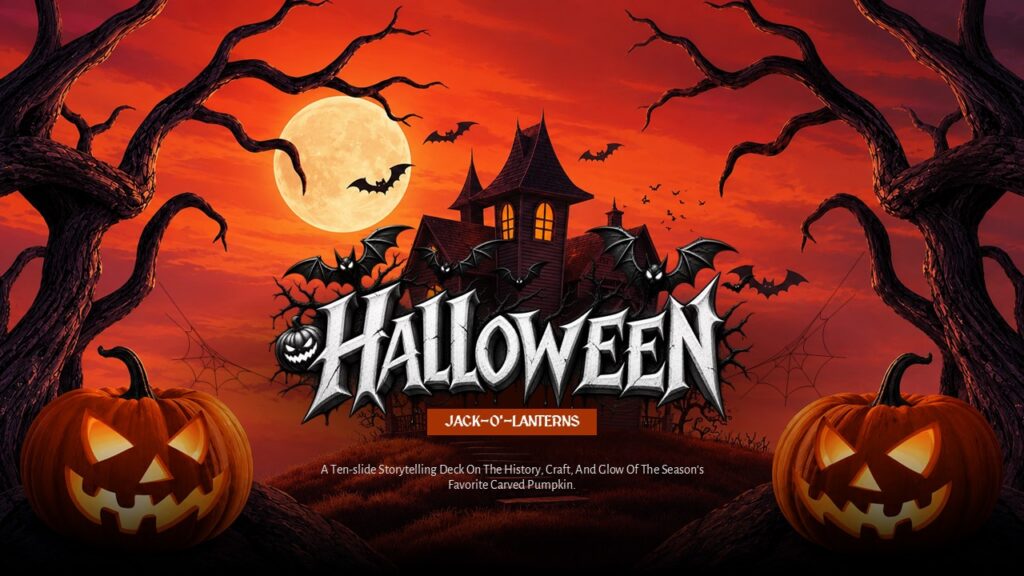
Kick off your Halloween presentations with a classic autumnal aesthetic that feels like a premium horror movie title sequence. Dominated by a rich burnt-orange and deep black palette, this SlideChef exclusive features an intricately illustrated scarecrow wielding a glowing carved pumpkin alongside haunted house infographics, bare-tree diagrams, and bat motifs. Despite its moody, gothic-inspired artwork, every slide maintains high readability with well-organized content blocks, bulleted lists, and process layouts. It is the perfect deck for holiday event planning, seasonal business announcements, or immersive spooky storytelling sessions where you need to leave a lasting visual impact.
Halloween Theme Family Feud Game Template

Transform your standard Halloween meeting into a full-blown game show with this playable Family Feud template. Designed with deep purple backgrounds, floating bats, and grinning pumpkins, this interactive deck brings the classic TV show experience right into your presentation. Moving beyond static slides, it incorporates engaging game design mechanics that make trivia truly dynamic. With a flexible structure that can easily support custom team selection wheels, visual health meters for scorekeeping, or audience lifelines, this deck provides a highly competitive foundation. Featuring pre-built, editable rounds like “Costume Chaos” and “Monster Mash,” you can seamlessly plug in your own spooky survey questions and get your entire audience actively participating.
Free Animated Halloween Template by SlideBazaar

If you want to bring your slides to life with smooth motion graphics, this fully animated offering from SlideBazaar is an excellent choice. Built around a vibrant color palette of deep purple, bright orange, and clean white, this deck relies on charming vector illustrations—like friendly ghosts, grinning pumpkins, and cute grim reapers—to keep the mood light and engaging. Beyond just looking great, it is packed with highly functional business layouts designed for real-world use. It includes a dedicated “Meet the Team” slide perfect for sharing office costume photos, a sleek “Services” layout utilizing creative coffin icons, and a themed pricing table. With all the slide transitions and element animations pre-built into the file, your content will flow seamlessly with zero technical effort on your part.
Halloween Party Invitation Poster – Halloween Flyer by SlideKit

If you want to break away from traditional pumpkins and friendly ghosts, this Slidekit template delivers a striking, streetwear-inspired aesthetic. Set against a heavily textured matte black background, it uses an electric neon green color palette and bold, oversized typography to instantly command attention. The focal point—a highly detailed, vibrant red skeleton riding a skateboard—gives the deck a unique, modern edge that appeals to a younger demographic. It is an outstanding choice for creative agencies hosting office parties, college campus events, or anyone looking to send out a digital invitation that feels more like an exclusive underground event flyer than a standard corporate slide.
Halloween Presentation Background by SlideKit

Sometimes, you do not need a complex, multi-slide layout—you just need a single, stunning backdrop to set the stage. This illustrated background template from SlideKit captures the quintessential spooky season aesthetic perfectly. Anchored by a striking gradient of deep purple and fiery orange, it creates a moody sunset that highlights the classic silhouettes of a haunted graveyard, twisted trees, and bats in flight. The foreground is dotted with glowing jack-o’-lanterns, while the dripping yellow typography adds a final touch of classic horror flair. Because it is highly visual and less constrained than a traditional corporate deck, it serves as a perfect title slide, an ambient backdrop for a Halloween party screen, or a captivating canvas for spooky storytelling.
Dark Castle Halloween Theme Template by SlidesMania

If you are looking to set a classic, spooky mood without overwhelming your content, this template from SlidesMania is a fantastic option for both PowerPoint and Google Slides. Anchored by a vibrant purple gradient sky and a massive, glowing full moon, the design relies on sharp black silhouettes of a haunted house, bare trees, and bats in flight to create a deeply atmospheric scene. The corners are framed with subtle spiderwebs, and it features a distressed, horror-style display font (like “Creepster”) for spine-chilling title slides, paired with clean, readable fonts for the body text. Because the visual elements are contained mostly to the edges and backgrounds, it leaves plenty of uncluttered space for you to split your content, list topics, and deliver your terrifying ideas clearly. It is a highly versatile deck that works exceptionally well for classroom storytelling, morning meetings, or creative seasonal projects.
Happy Halloween Newsletter by PPTMON

If you need to send out a seasonal company update, a school event recap, or a community announcement, this template from PPTMON leans heavily into the fun, sweet side of “trick-or-treat.” Set against a vibrant, energetic purple background, the borders of each slide are heavily decorated with playful 3D elements, including carved pumpkins, candy corn, flying bats, and swirling candy canes. To ensure your actual information does not get lost in the festive chaos, the design cleverly utilizes lightly tinted content boxes with subtle dashed borders to keep text highly readable. It comes fully equipped with practical layouts, including an icon-driven agenda slide, timeline graphics, and circular photo placeholders that are absolutely perfect for showing off your team’s Halloween costumes.
Trick or Treat Halloween Party Template by SlideChef

Dive into event logistics without losing the spooky spirit. This premium-quality free template from SlideChef is tailored specifically for organizing community trick-or-treat events, neighborhood routes, or large-scale Halloween parties. The design contrasts a deeply atmospheric haunted village background—complete with glowing jack-o’-lanterns and a full moon—against crisp, teal content boxes that ensure your information remains highly readable. Packed with highly functional layouts, it includes a “Trick-or-Treat Route” timeline, a detailed “Night Schedule,” and a metrics slide perfectly suited for sharing event statistics or costume contest results.
Essential Elements of a Great Halloween Presentation
While downloading a pre-made template saves hours of formatting, understanding the core principles of seasonal design allows you to customize your slide deck without ruining its professional appeal. Whether you are building a presentation from scratch or tweaking a downloaded file, keeping these three essential design rules in mind will ensure your Halloween presentation remains both festive and highly effective.
- Nailing the Color Palette: It is tempting to throw every spooky color you can think of onto a single slide, but a professional deck relies on restraint. Stick to a strict palette of three to four core colors—such as Midnight Blue, Pumpkin Orange, and Ghost White—to create a cohesive aesthetic. Using every color in the rainbow creates visual clutter and makes your presentation look amateurish. A tight, deliberate color scheme instantly establishes a sophisticated mood while keeping the focus on your data.
- Choosing the Right Typography: The secret to excellent presentation typography is balancing the holiday theme with actual legibility. For your title slides and main section headers, embrace the season by using a heavily stylized, “creepy” display font (think dripping letters, gothic serifs, or vintage horror styles). However, you must pair this with a clean, highly readable Sans-Serif font for your body text and bullet points. Forcing your audience to read paragraphs of data or dense lists in a complex novelty font will quickly lead to eye strain and audience disengagement.
- Using High-Quality Vectors: Nothing ruins a beautiful slide deck faster than pasting in a pixelated, watermarked piece of clip-art pulled directly from a random image search. To maintain a high-quality, professional look, exclusively use crisp, scalable vectors or transparent, high-resolution PNGs. If you need to swap out graphics or add your own spooky accents, always source your imagery properly. You can explore SlideChef’s extensive vector and icon libraries, which offer thousands of perfectly formatted, presentation-ready assets that will never blur or pixelate, no matter how large you stretch them on the screen.
Bring Your Spooky Ideas to Life
Crafting the perfect Halloween presentation does not require a graphic design degree or hours of frustrating formatting. By leveraging these free, pre-designed resources across PowerPoint, Google Slides, and Canva, you can instantly secure the exact spooky aesthetic you need and spend your time focusing on what really matters—delivering an engaging message to your audience.
Ready to take your seasonal slides to the next level? Explore the full, premium-quality seasonal library at SlideChef for even more highly customizable presentation templates, professional infographics, and interactive layouts guaranteed to make your next presentation a scream.
About The Author


Related Blogs