Table of Contents
How to Write an Action Plan to Achieve Your Goal
Easy Guide to Develop an Action Plan (Steps, Example & Template)
Have you ever set an important goal, only to feel overwhelmed by where to start or struggle to keep a project on track? A clear action plan can make the difference between a goal that stays on paper and one you actually achieve. It breaks your objectives into manageable tasks, assigns responsibilities, sets realistic deadlines, and helps you measure progress along the way. Whether you’re managing a business project, planning a marketing campaign, or working toward a personal goal, learning how to write an action plan helps you stay organized, avoid costly delays, and focus on what matters most. In this guide, you’ll learn the essential steps, see a practical action plan example, and discover how to create a plan you can confidently put into action.
What Is an Action Plan?
An action plan is a step-by-step document that outlines the tasks, resources, responsibilities, and deadlines needed to achieve a specific goal. It turns a broad objective into a clear roadmap, helping individuals and teams understand what needs to be done, who will do it, and how success will be measured.
Unlike a general list of goals, an action plan focuses on execution. It breaks larger objectives into smaller tasks, assigns each task to a responsible person, establishes realistic timelines, and defines measurable outcomes. This makes it easier to track progress, identify potential obstacles, and adjust your approach when priorities change.
For example, if your goal is to increase website traffic by 25% within three months, your action plan might include publishing SEO-focused blog posts, updating existing content, improving internal links, and monitoring organic traffic every week. Each task would have an assigned owner, a deadline, and a clear way to measure its results.
Action plans are useful for business projects, marketing campaigns, team initiatives, and personal development goals. By turning ideas into specific actions, they help you stay accountable, use resources effectively, and make consistent progress toward your desired outcome.
What Should an Action Plan Include?
A well-structured action plan should make it easy to understand your goal, identify the work required, and track progress from start to finish. While the format may vary depending on the project, an effective action plan typically includes the following key elements:
| Element | What to Include |
|---|---|
| Goal and objectives | Define the outcome you want to achieve and set measurable targets. |
| Action steps | Break the goal into specific, manageable tasks that can be completed. |
| Task owners | Assign responsibility to individuals or team members for each task. |
| Timeline and deadlines | Set start dates, due dates, and milestones to keep work on schedule. |
| Required resources | Identify the budget, tools, skills, information, and people needed to complete the tasks. |
| Success metrics | Decide how you will measure results using KPIs or other measurable indicators. |
| Progress tracking | Record the status of each task, identify delays, and monitor completed work. |
| Potential risks | Identify possible obstacles and determine how you will address them if they occur. |
For example, a marketing team planning to increase website traffic might set a goal of growing organic visits by 20% within three months. The team could break this objective into tasks such as updating existing blog posts, publishing new keyword-focused content, and improving internal linking. Each task would have an owner, a deadline, and a performance metric to measure its impact.
The key is to make every action clear, measurable, and time-bound. When these elements work together, your action plan becomes a practical working document rather than just a list of intentions. You can use it to assign work, communicate expectations, monitor progress, and make informed adjustments as your project moves forward.
Best Action Plan Templates You Can Download
Creating an action plan from scratch can take time, especially when you need to organize tasks, assign responsibilities, and set realistic deadlines. Using a ready-made action plan template gives you a structured starting point, so you can focus on your goals instead of building a layout from scratch.
Explore these action plan templates for different needs, from managing business projects to organizing marketing campaigns and tracking personal goals. Choose a format that fits your requirements, customize it with your details, and start planning your next steps.
Free Action Plan Template by SlideChef
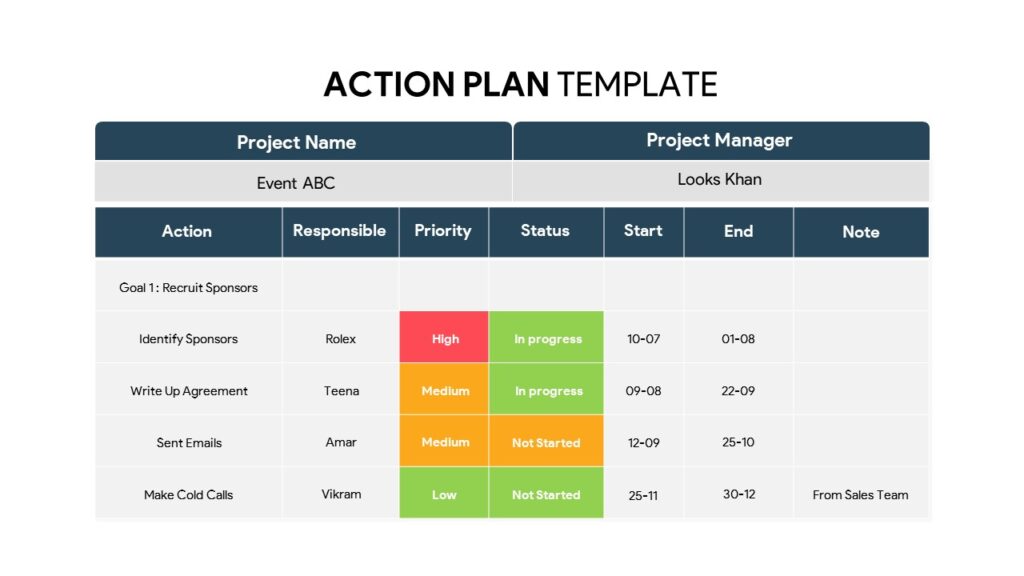
Download this professionally designed Action Plan Template to streamline your project execution, align team members, and track deliverables from start to finish. Featuring a clean, structured layout with clear priority indicators, task ownership, and timeline tracking, this slide makes project management effortless and visually engaging. Perfect for business meetings, project pitches, and operational reviews.
30 60 90 Day Plan PowerPoint Template
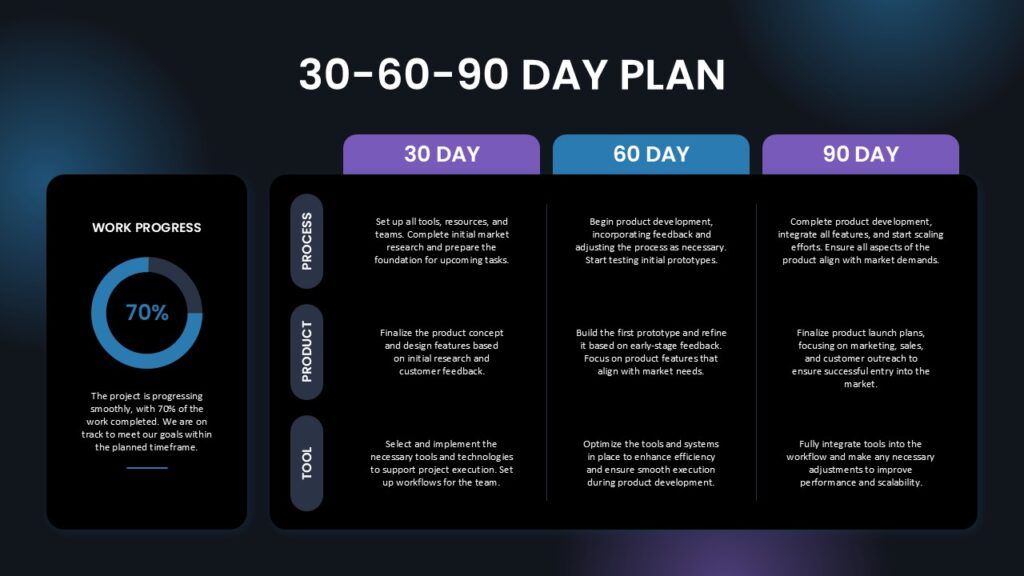
Download this sleek and professional 30-60-90 Day Plan Template to map out strategic goals, streamline onboarding, or guide your project milestones with absolute clarity. Featuring a modern dark-mode layout equipped with dedicated columns for 30, 60, and 90-day timelines, row categories for process, product, and tools, plus a built-in work progress tracker, this slide makes long-term planning visually compelling and easy to execute. Perfect for leadership presentations, product roadmaps, and team alignment.
100 Days Action Plan Template by SlideKit
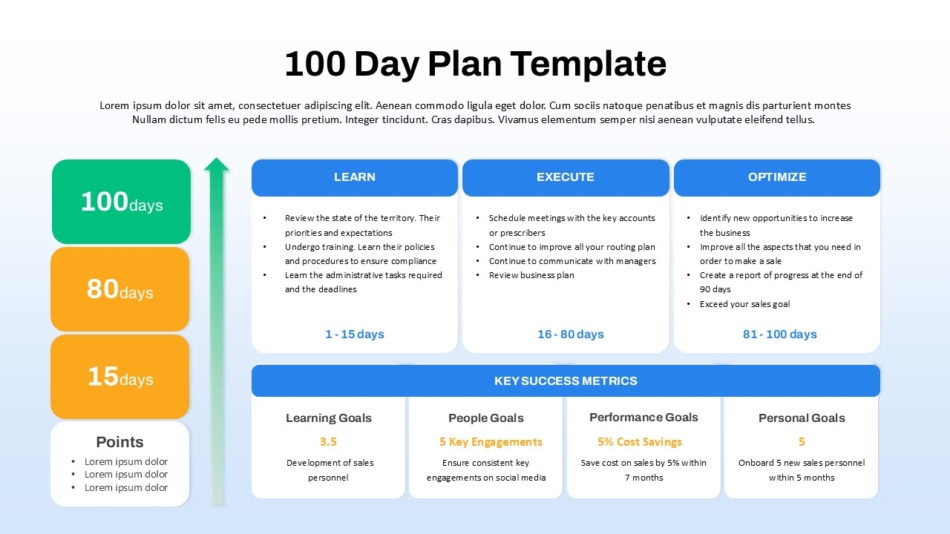
Get this professionally designed 100 Day Plan Template to structure leadership onboarding, outline strategic execution phases, and track key performance metrics with absolute clarity. Featuring dedicated columns for Learn (1-15 Days), Execute (16-80 Days), and Optimize (81-100 Days), alongside a comprehensive Key Success Metrics dashboard tracking learning, people, performance, and personal goals, this slide makes long-term roadmap planning structured and visually engaging. Perfect for executive presentations, management transitions, and strategic business reviews.
Mutual Action Plan Presentation Template – By SlideBazaar
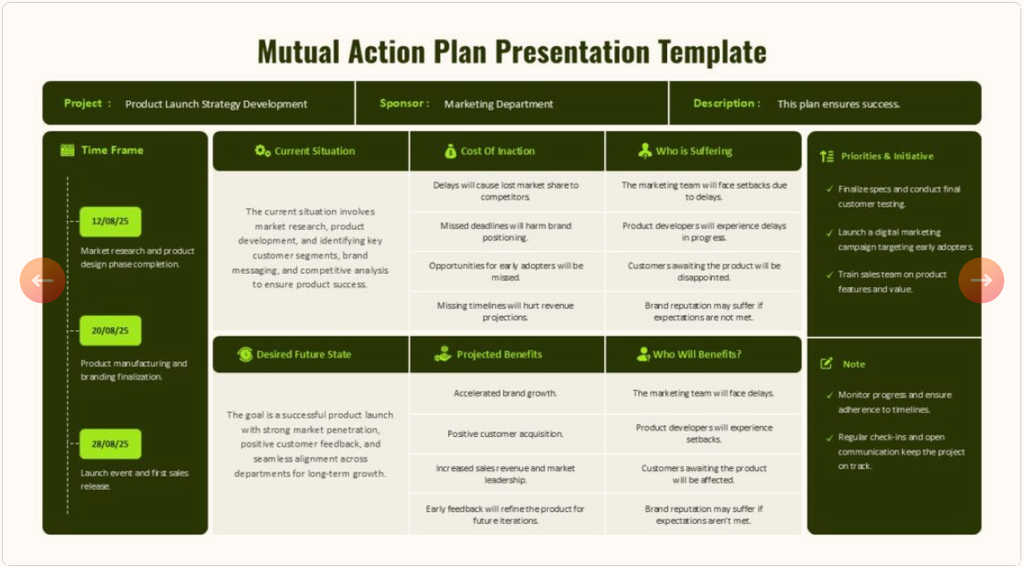
Streamline collaborative project management and drive cross-functional alignment with this Mutual Action Plan Presentation Template. Designed with an organized matrix to track project timelines, current roadblocks, desired future states, and key stakeholder priorities, this layout keeps teams fully synchronized from kickoff to completion. Perfect for closing complex enterprise deals, managing joint ventures, and aligning stakeholders on clear strategic milestones.
Tips for Creating an Effective Action Plan
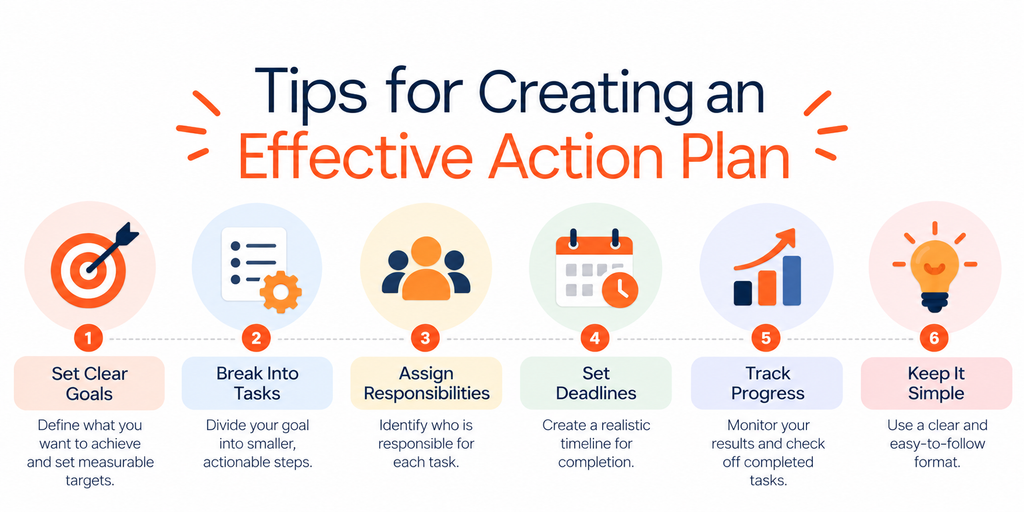
Writing an action plan is only the first step. To achieve your goals, you need a plan that is realistic, easy to follow, and flexible enough to adapt when priorities change. The following tips will help you create an effective action plan and keep your work moving in the right direction.
1. Set Clear and Measurable Goals
Start by defining exactly what you want to achieve and how you will measure success. Avoid vague objectives such as “improve sales” or “increase productivity.” Instead, set specific targets with measurable outcomes and a realistic timeframe.
2. Break Large Goals Into Smaller Tasks
Large objectives can feel overwhelming when you don’t know where to begin. Divide your goal into smaller, actionable tasks that can be completed step by step. This makes it easier to prioritize work, estimate timelines, and track progress.
3. Assign a Responsible Person to Every Task
Make accountability part of your action plan by identifying who is responsible for each activity. When multiple team members are involved, clarify individual responsibilities and expected deliverables to reduce confusion and duplicated effort.
4. Set Realistic Deadlines and Priorities
Create a timeline that accounts for task complexity, available resources, and dependencies between activities. Prioritize tasks that have the greatest impact on your goal, and leave enough flexibility to handle unexpected delays without disrupting the entire plan.
5. Track Progress and Review Your Results Regularly
Review your action plan at consistent intervals to check completed tasks, upcoming deadlines, and performance against your targets. Use measurable indicators, such as completed milestones or campaign results, to identify what’s working and where adjustments are needed.
6. Keep Your Action Plan Simple and Accessible
An action plan should make work easier, not introduce unnecessary complexity. Use a clear format with concise task descriptions, assigned owners, deadlines, and progress indicators. Keep the plan accessible to everyone involved so team members can quickly understand their responsibilities and stay aligned.
Remember: An effective action plan is not a document you create once and forget. Review it regularly, update tasks as circumstances change, and use the results to make better decisions. A clear, well-maintained plan helps you turn your objectives into meaningful progress.
Common Action Plan Mistakes to Avoid
Even a well-written action plan can fall short if it isn’t realistic, clearly organized, or regularly reviewed. Recognizing common mistakes early helps you avoid unnecessary delays, keep your team accountable, and stay focused on your goals.
1. Setting Vague or Unrealistic Goals
Goals such as “grow the business” or “improve performance” don’t provide a clear direction. Without measurable targets, it’s difficult to determine whether your action plan is working. Define specific outcomes and set achievable targets within a realistic timeframe.
2. Including Too Many Tasks at Once
Overloading your action plan with too many activities can make it difficult to identify priorities. Break your main objective into manageable tasks, focus on the most important activities first, and add secondary tasks as needed.
3. Failing to Assign Clear Responsibilities
When tasks don’t have designated owners, team members may assume someone else is responsible. Assign a person to each action item and communicate the expected result so everyone understands their role.
4. Ignoring Deadlines and Task Dependencies
A list of tasks without realistic deadlines can lead to missed milestones and project delays. Establish a timeline, identify tasks that depend on earlier activities, and allow enough time for reviews, approvals, and unexpected challenges.
5. Not Tracking Progress or Measuring Results
Creating an action plan doesn’t guarantee that the work will be completed as expected. Without regular progress checks, small problems can become bigger obstacles. Track task status, measure performance against your goals, and update the plan whenever necessary.
6. Using a Complicated or Disorganized Format
An action plan filled with unnecessary details or inconsistent formatting can be difficult to understand and maintain. Organize information into clear sections or columns for tasks, owners, deadlines, resources, and status. For team presentations, a visual action plan can also make priorities and milestones easier to communicate.
The key takeaway: Keep your action plan focused, assign clear ownership, set realistic deadlines, and review progress consistently. Avoiding these common mistakes makes it easier to turn your plan into practical actions and measurable results.
Action Plan vs. Project Plan vs. To-Do List
Although action plans, project plans, and to-do lists all help organize work, they serve different purposes. Understanding the differences helps you choose the right format for your goals, whether you’re managing a team project, planning a business initiative, or organizing daily tasks.
| Feature | Action Plan | Project Plan | To-Do List |
|---|---|---|---|
| Main purpose | Turn a goal into specific actions | Manage an entire project from start to finish | Keep track of tasks that need to be completed |
| Level of detail | Focuses on actions, owners, and deadlines | Covers scope, schedule, resources, risks, and dependencies | Usually contains a simple list of tasks |
| Typical duration | Varies depending on the goal | Often spans the full project lifecycle | Usually daily or short-term |
| Progress tracking | Tracks actions and measurable outcomes | Tracks project milestones, deliverables, and overall performance | Tracks whether individual tasks are completed |
| Best for | Achieving a specific objective | Coordinating a complex project | Managing everyday responsibilities |
Which One Should You Use?
Choose an action plan when you need a clear roadmap for achieving a specific goal, such as increasing sales or launching a marketing campaign. Use a project plan when you need to coordinate a larger project involving multiple workstreams, resources, and dependencies. A to-do list is best for managing routine tasks and remembering what needs to be done.
These tools can also work together. For example, a project plan can define the overall project, an action plan can outline the steps needed to achieve a particular objective within it, and a to-do list can help each team member manage their daily tasks.
Conclusion: Turn Your Goals Into an Actionable Plan
Knowing how to write an action plan helps you turn ideas into clear, achievable steps. By defining measurable goals, breaking them into manageable tasks, assigning responsibilities, setting realistic deadlines, and tracking progress, you can stay organized and work toward your objectives with greater confidence.
The key is to create a plan that is practical, easy to follow, and flexible enough to adapt when priorities change. Whether you’re managing a business project, organizing a marketing campaign, or working toward a personal goal, the right action plan can help you stay accountable and measure your progress along the way.
Ready to put your plan into action? Explore SlideChef’s Action Plan PowerPoint Template to organize your goals, tasks, and milestones in a clear, professional presentation. Customize the slides to suit your needs and communicate your next steps with confidence.
What are the 7 steps of an action plan?
The seven steps of an action plan are defining your goal, breaking it into actionable tasks, assigning responsibilities, prioritizing activities, setting deadlines, identifying resources and risks, and tracking progress. Following these steps helps you turn a broad objective into a structured plan with clear responsibilities and measurable outcomes.
What should be included in an action plan?
An effective action plan should include a clearly defined goal, specific tasks, responsible individuals, deadlines, required resources, success metrics, progress updates, and potential risks. These elements help you understand what needs to be done, when it should happen, and how you will measure success.
What is a simple example of an action plan?
A simple action plan could involve increasing website traffic by 20% within three months. The tasks might include researching keywords, updating existing blog posts, publishing new content, and tracking organic traffic. Each task should have an assigned owner, a deadline, and a measurable result.
How do you write an effective action plan for a business?
To write an effective business action plan, start by defining a specific business objective and setting measurable targets. Break the objective into smaller tasks, assign responsibilities, establish deadlines, identify the resources required, and decide how you will measure progress. Review the plan regularly and make adjustments based on performance and changing priorities.
How often should you review an action plan?
Review your action plan regularly based on the project’s complexity, deadlines, and pace of work. Active projects may require weekly check-ins, while longer-term goals may need monthly reviews. Update task statuses, check progress against targets, and revise deadlines or responsibilities when necessary.
Can you create an action plan in PowerPoint?
Yes. PowerPoint is useful for creating visual action plans that communicate goals, tasks, responsibilities, timelines, and milestones. It is particularly helpful when presenting a plan to managers, stakeholders, or team members. You can use a ready-made action plan PowerPoint template to organize information into professional slides and customize the layout to fit your project.
About The Author





Related Blogs