


Project Schedule Sheet Template
0
About the Template
Project Schedule Plan Template for PowerPoint and Google Slides
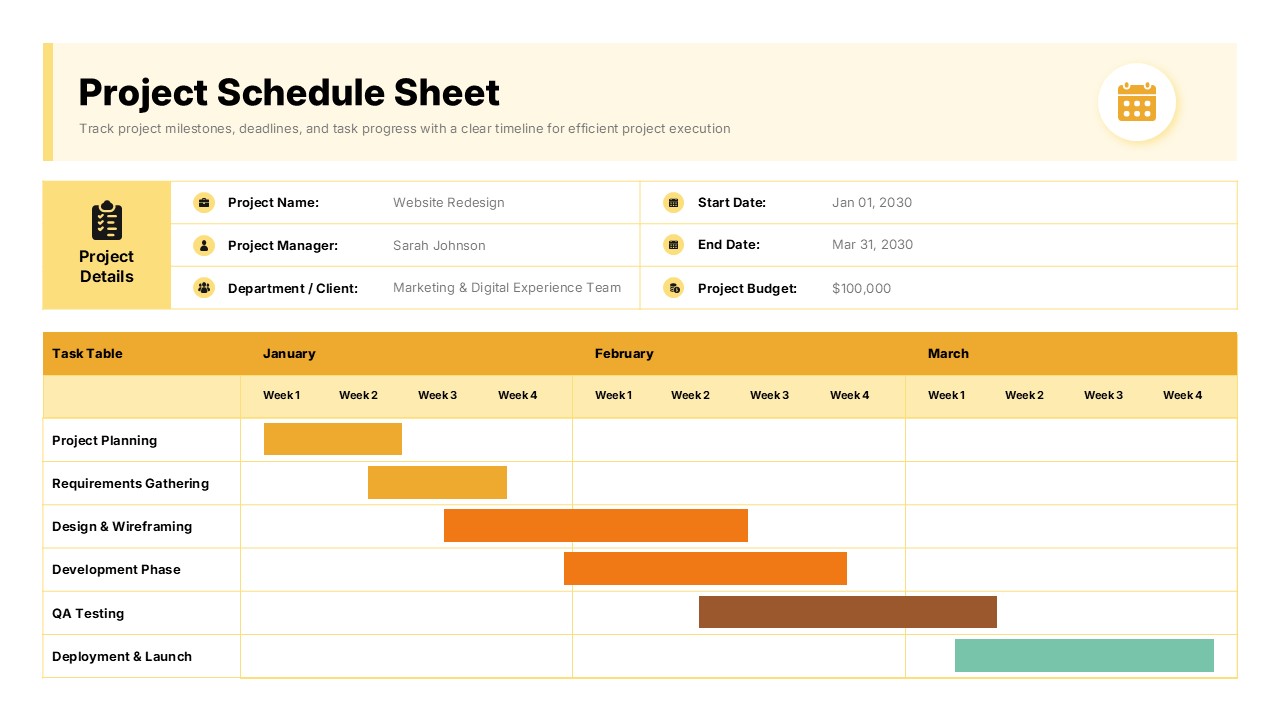
Keeping a project on track is one of the most demanding challenges any manager, team lead, or stakeholder faces. Timelines shift, priorities compete, and without a clear visual plan, even the most organized teams can lose focus. This Project Schedule Sheet Template gives you a powerful, polished way to map out every phase of your project from kickoff to launch, all in a single, scannable slide that communicates everything at a glance.
About Design of this Project Schedule Sheet Template
This project management template is built around a clean, professional Gantt chart layout with a warm golden yellow and amber color palette set against a soft cream ivory background. The header spans the full width at the top, followed by a structured project details panel that uses a two-column grid to display six key metadata fields including project name, manager, department, start date, end date, and budget. Each field is paired with a matching icon, including briefcase, calendar, and budget icons, making the information instantly recognizable without dense text. The Gantt chart section dominates the lower portion of the slide, presenting six task bars across a three-month weekly timeline in distinct colors: amber for planning tasks, orange for active development and design phases, muted taupe for QA testing, and teal for deployment and launch.
This Project Schedule template is ready to customize from the moment you download it. Swap in your own project name, dates, team members, and task bars without needing design experience. Whether you are presenting to a boardroom, briefing your team, or reporting to a client, this single slide delivers the professional clarity your project deserves.
Where Use this Project Schedule Sheet Template
- Project Kickoff Meetings: Walk your team through the full project timeline, task ownership, and key milestones during the first planning session to align everyone from day one.
- Stakeholder Status Reporting: Present a snapshot of the current project schedule to executives or clients, showing phase progress and upcoming deliverables in a single, digestible view.
- Website or App Redesign Planning: Map out discovery, design, development, QA, and launch phases across a multi-month timeline with color-coded bars that make sequencing crystal clear.
- Marketing Campaign Scheduling: Visualize campaign phases including strategy, creative production, review cycles, and go-live dates for campaign teams and brand managers.
- Product Launch Coordination: Organize cross-functional tasks across departments such as engineering, design, marketing, and operations with clearly assigned timelines and ownership details.
- Client Deliverable Planning: Share a professional, branded project schedule with clients during onboarding or discovery phases to establish trust and set clear expectations.
- Annual or Quarterly Planning Reviews: Use the Gantt format to present strategic initiatives and delivery timelines during leadership planning sessions or quarterly business reviews.
No matter your industry or role, if you manage timelines and need to communicate them clearly, this Project Schedule Sheet is exactly what you need. Download this business management template now and bring clarity, structure, and professionalism to your next project presentation.


Related
-

Animated Product Launch Plan Template PPT and Google Slides
-

Gantt Chart Template PowerPoint and Google Slides
-
Project Proposal Template for PowerPoint and Google Slides
-

Team Introduction Template for PowerPoint and Google Slides
-
Construction Proposal Template for PowerPoint and Google Slides
-
Schedule 3 Drugs Template – Free PowerPoint and Google Slides

Are you looking for Custom Presentation Template Designs?
It is a long established fact that a reader will be distracted by the readable content of a page when or randomised words which don’t look even slightly believable


