Table of Contents
- Guide How AI-Generated Presentations Ruin Your Business
- How We Created Business Presentations Before AI
- How AI Has Changed the Way We Create Business Presentations
- How AI Is Killing Your Business Presentation
- Why We Should Limit the Use of AI When Creating Business Presentations
- How to Create Better Business Presentations Without Depending Entirely on AI
- Best Professional Business Presentation Templates for Every Business Need
- What Makes a Great Business Presentation in the Age of AI?
- The Future of Business Presentations: Will AI Replace Human Creativity?
- Final Thoughts: Let AI Assist Your Presentation, Not Define It
How AI is Killing Your Business Presentations?
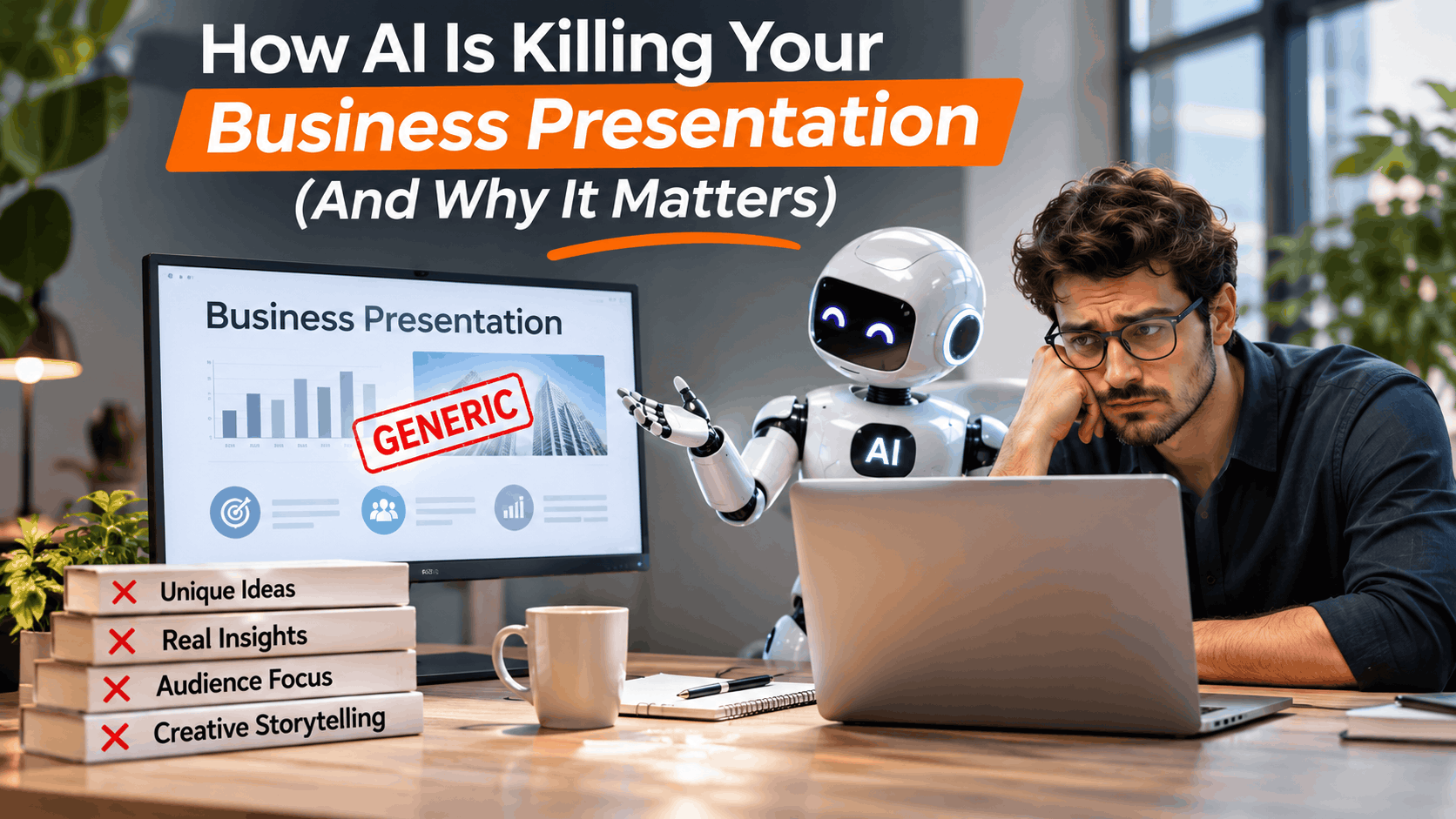
Guide How AI-Generated Presentations Ruin Your Business
Having worked with presentation designs and templates, I’ve seen how much the process of creating a presentation has changed over the years. There was a time when putting together a good business presentation meant spending hours researching a topic, organizing information, finding the right visuals, and designing every slide carefully. Today, AI can do most of these things in just a few minutes. Give it a prompt, and you have an entire presentation ready before you know it.
At first, this feels like a huge improvement. Less time designing, fewer hours spent writing, and no need to start from a blank slide. But the more I look at AI-generated presentations, the more I notice something concerning. Many presentations are starting to look and feel the same. The layouts are predictable, the content is often generic, and the visuals don’t always communicate what the presenter actually wants to say.
The problem isn’t AI itself. It’s how heavily we have started depending on it. A business presentation is more than a collection of slides put together by a tool. It needs original thinking, a clear message, visual storytelling, and an understanding of the audience. In this article, I’ll explain how AI has changed the presentation creation process, where it is going wrong, and why we need to be more thoughtful about using AI when creating our next business presentation.
How We Created Business Presentations Before AI
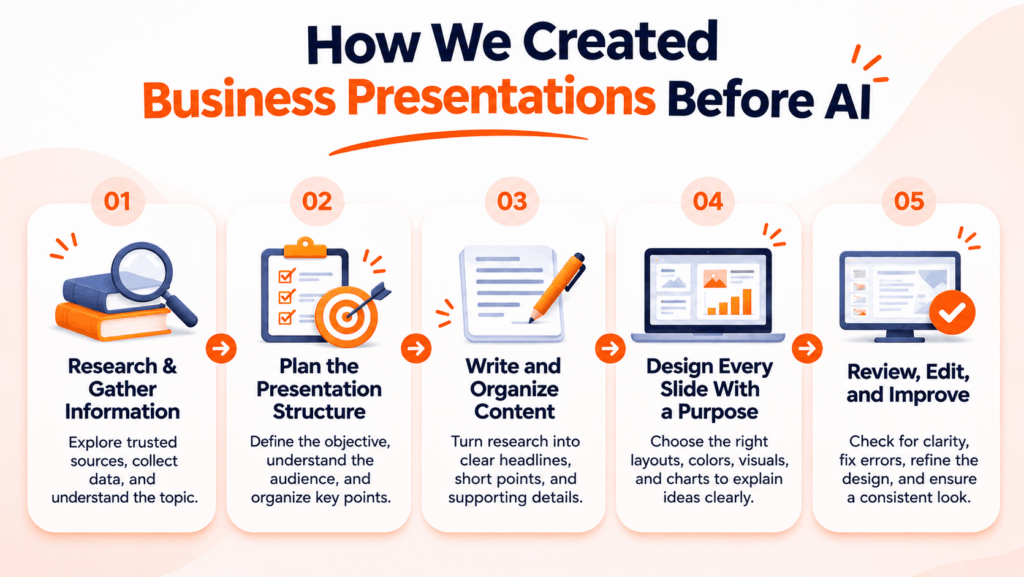
Before AI presentation makers became popular, creating a business presentation required much more than entering a topic and clicking a generate button. We had to take responsibility for every part of the process, from researching the subject and organizing information to writing content and designing individual slides. Whether we created a sales pitch, business strategy, company profile, or financial report, we followed a process that helped us understand the topic and communicate our ideas effectively.
Let’s look at how we approached presentation creation before AI changed the workflow.
1. We Started With Research and Information Gathering
We didn’t simply enter a topic and expect a tool to generate everything for us. We searched for information, explored different websites, read industry reports, collected statistics, and studied relevant examples. We had to understand the subject before deciding what information belonged in our presentation.
2. We Planned the Presentation Structure
Once we gathered enough information, we organized our ideas and decided how to present them. We identified the main objective, understood our audience, and created a logical sequence of slides. We carefully planned the introduction, main discussion, supporting information, and conclusion to make the presentation easy to follow.
3. We Wrote and Organized the Content
We turned our research into meaningful headlines, short explanations, key points, and supporting information. Instead of filling slides with everything we knew, we selected the information that helped communicate our message. We also worked on connecting one slide to another so the audience could follow the presentation without confusion.
4. We Designed Every Slide With a Purpose
This was one of the most creative parts of the process. We selected color combinations, typography, layouts, icons, illustrations, and images that matched the presentation topic. We created charts, diagrams, timelines, and infographics to explain complex information visually. Every design decision played a role in making the content easier to understand.
5. We Reviewed, Edited, and Improved the Presentation
Our first version rarely became the final presentation. We reviewed the content, corrected mistakes, adjusted layouts, replaced unsuitable images, and removed unnecessary information. We also checked whether the slides followed a consistent design and communicated the intended message.
The entire process took time, but it gave us something valuable: control over our ideas and creativity. We understood what we were presenting because we participated in every stage of its creation. More importantly, we developed the ability to research, organize information, tell stories, and communicate ideas through visual presentations.
How AI Has Changed the Way We Create Business Presentations
AI has completely changed how we approach presentation creation. What once took hours of research, content writing, and slide designing can now happen in just a few minutes. We no longer need to start every presentation from scratch or manually handle every design task. AI tools can help us research topics, organize information, write content, generate images, and create complete slide decks.
Tools like ChatGPT, Microsoft Copilot, Gamma, and Canva have made presentation creation accessible to almost everyone. Even without professional design experience, we can now generate slides, experiment with layouts, and prepare presentations for different business needs.
Let’s look at the biggest changes AI has brought to the presentation creation process.
1. From Manual Research to AI-Powered Research
Earlier, we searched through websites, reports, articles, and other resources to collect information. Now, we can use AI tools to summarize documents, explore ideas, organize research, and find useful information much faster. Instead of spending hours gathering information, we can begin with an organized starting point and focus on understanding and verifying the content.
2. From Planning Every Slide to Generating Presentation Outlines
We previously planned the entire presentation structure ourselves, deciding what each slide should cover and how the information should flow. Today, we can simply describe our topic, audience, and objective to an AI tool and ask it to generate a presentation outline. It can suggest slide titles, arrange key points, and create a starting structure for the deck.
3. From Writing Content Manually to AI-Generated Text
Writing presentation content requires us to summarize information and communicate ideas in a clear, concise way. AI can now generate headlines, bullet points, descriptions, summaries, and speaker notes within seconds. We can also ask it to rewrite lengthy paragraphs, simplify technical explanations, and adjust the tone for different audiences.
4. From Designing Individual Slides to Automated Slide Creation
This is probably one of the biggest changes. Earlier, we selected layouts, arranged elements, adjusted typography, and designed slides individually. Now, AI presentation makers can generate multiple slides with suggested layouts, colors, images, and visual elements. Tools like Gamma and Canva make it easier to turn a simple topic or written outline into a complete visual presentation.
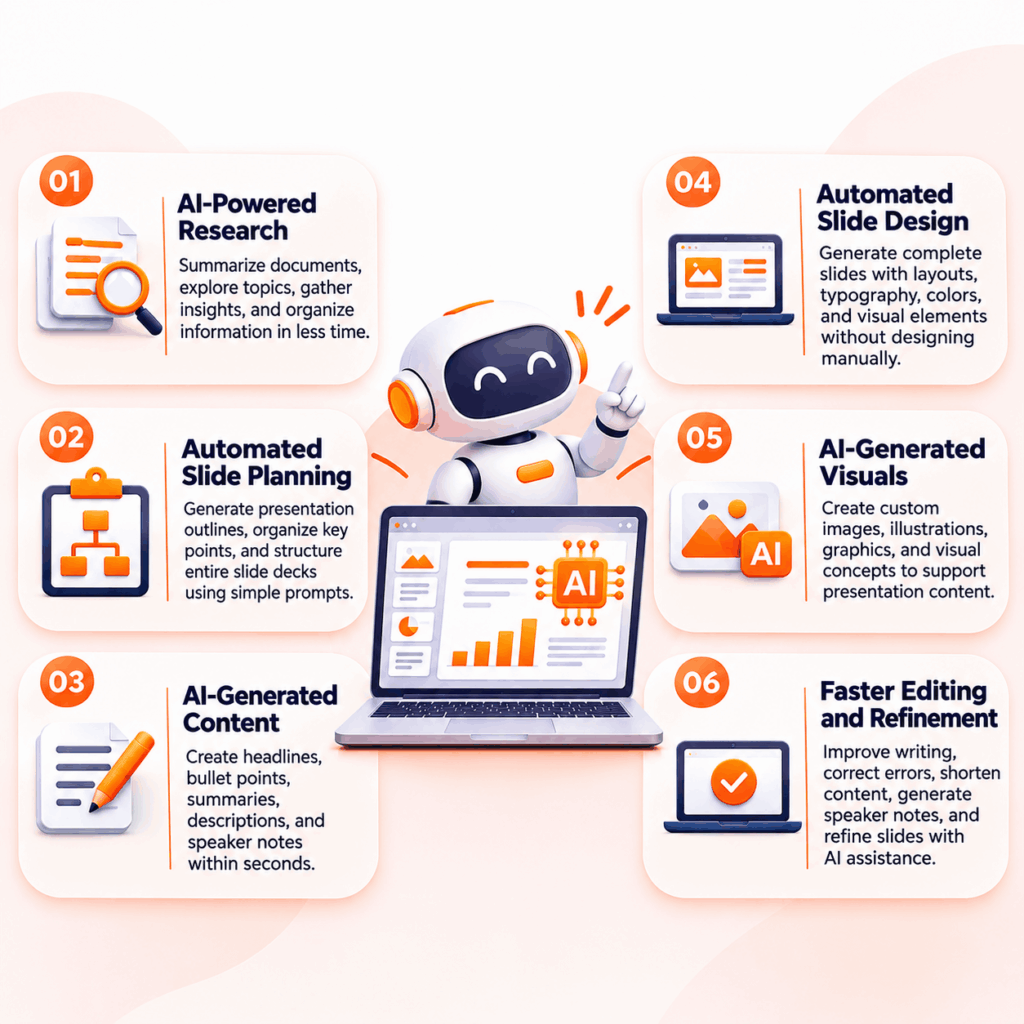
5. From Searching for Visuals to AI-Generated Images and Graphics
Finding the right images, illustrations, and icons used to take considerable time. Today, we can describe the visual we need and use AI image generators to create custom graphics. AI can also suggest visual concepts, diagrams, and layouts that help explain business ideas.
6. From Manual Editing to AI-Assisted Improvements
We can now use AI to proofread content, shorten lengthy text, improve headlines, summarize information, and suggest design changes. Rather than making every correction manually, we can use these tools to speed up the editing process and refine our presentations.
There is no doubt that AI has made presentation creation faster and more accessible. We can now spend less time handling repetitive tasks and more time working on ideas. But this convenience also comes with a challenge. When we allow AI to handle research, content, storytelling, visuals, and design without carefully reviewing its output, we risk losing control over the quality of our presentations. And that’s where things start to go wrong.
How AI Is Killing Your Business Presentation
AI has made it incredibly easy to create presentations, but creating slides quickly doesn’t mean we’re creating effective presentations. When we depend entirely on AI, we often sacrifice the very things that make a presentation interesting: creativity, originality, storytelling, and meaningful communication.
Think about the number of business presentations we see today. Many follow the same structure, use similar layouts, repeat generic phrases, and rely on visuals that don’t always match the subject. We can generate a complete slide deck in minutes, but we still need to ask ourselves whether it communicates the right message.
Here are some ways excessive AI use can hurt the quality of our business presentations.
1. Every Presentation Starts Looking the Same
One of the biggest problems with AI-generated presentations is the lack of originality. Most AI presentation tools work with predefined design patterns, layouts, and visual suggestions. When different people use similar prompts and tools, they often end up with presentations that look remarkably alike.
We might get clean layouts, consistent colors, and neatly arranged content, but that doesn’t automatically give our presentation a unique identity. A startup pitch deck, a company profile, and a sales strategy presentation shouldn’t all look like variations of the same template.
A good presentation should reflect the business, its personality, and its message. Instead of accepting the first design AI generates, we should customize layouts, experiment with visual styles, and create something that represents our ideas.
2. Creativity Is Being Replaced by Convenience
Earlier, we explored different design ideas, experimented with layouts, searched for creative visual references, and tried different ways to communicate information. Today, we can ask AI to do most of these things for us.
The convenience is undeniable, but we shouldn’t let it replace our creative thinking. When we accept whatever AI generates without exploring alternatives, we miss opportunities to develop original concepts and better visual ideas.
AI can suggest a design direction, but we should decide whether that direction actually works for our presentation. Creativity comes from understanding the subject, experimenting with possibilities, and making thoughtful design decisions.
3. Presentations Are Becoming Too Text-Heavy
AI can generate paragraphs, explanations, bullet points, and summaries within seconds. But when we ask it to explain everything about a topic, it often gives us more content than a slide actually needs.
This creates a common problem: slides become crowded with long sentences, unnecessary bullet points, and information that the audience doesn’t have enough time to read.
Remember, a PowerPoint presentation shouldn’t look like a written report. We should highlight important information, use short explanations, and communicate complex ideas through charts, diagrams, icons, and infographics.
A good slide helps the audience understand the message quickly instead of making them read an entire paragraph.
4. Storytelling Gets Lost in AI-Generated Content
A successful business presentation needs a clear story. Whether we’re pitching a business idea, presenting a marketing strategy, or explaining company performance, we need to guide the audience from one idea to the next.
AI can organize information into slides, but it doesn’t automatically understand the context behind our message. It may generate a logical sequence of headings and bullet points without building a compelling argument or creating a meaningful connection between slides.
We should decide how to introduce an idea, which information deserves attention, where to present supporting evidence, and how to conclude with a strong takeaway.
Without that thinking, we end up with a collection of slides rather than a presentation that tells a story.
5. Generic AI Images Are Hurting Visual Communication
AI image generators have made it easier to create custom visuals, but generating an image doesn’t guarantee that it will improve our presentation.
We often see generic illustrations, artificial-looking business characters, irrelevant backgrounds, and visuals that don’t accurately represent the subject. Sometimes, the images look attractive on their own but have little connection with the information on the slide.
For example, a financial report needs clear charts and relevant data visualizations. A technology presentation may need technical diagrams, product visuals, or process illustrations. Adding a random AI-generated businessperson or decorative graphic doesn’t make the information easier to understand.
We should choose visuals based on what we want to communicate, not simply because an AI tool can generate them.
6. Unverified Information Can Damage Your Credibility
AI can help us research topics, summarize reports, and generate supporting information. However, we shouldn’t assume that everything it produces is accurate.
AI tools can sometimes generate incorrect statistics, outdated information, misleading explanations, or references that don’t support the claims we want to make.
This becomes particularly serious in business presentations. Imagine presenting an incorrect revenue figure to investors, sharing an inaccurate market statistic with clients, or using outdated information in a strategic business meeting.
Even one incorrect claim can damage the credibility of the entire presentation.
We should always verify important facts, check original sources, and review numbers before including them in our slides. Never let AI make important business claims on your behalf without checking the evidence.
7. We Are Losing the Ability to Think and Present Independently
When AI writes our content, structures our slides, and prepares our speaker notes, we may end up presenting information without fully understanding it.
This creates a problem when someone asks an unexpected question or challenges an idea during a meeting. If we don’t understand the information behind our slides, we may struggle to explain our decisions or support our recommendations.
We should use AI to organize our thoughts, not think on our behalf. When we understand the subject and actively participate in creating the presentation, we can communicate more naturally, answer questions confidently, and defend our ideas.
8. Attractive Slides Are Taking Priority Over Meaningful Communication
AI presentation tools can create visually polished slides, but a beautiful design doesn’t guarantee a successful presentation.
We sometimes spend too much time looking at colors, layouts, animations, and visual effects while overlooking the actual purpose of the presentation. A sales presentation should help convince potential customers. An investor pitch should communicate the business opportunity. A performance report should help decision-makers understand results.
Every slide should serve a purpose. If a visual element doesn’t support the message, it doesn’t need to be there.
We should always remember that the real goal of a business presentation isn’t to impress people with attractive slides. It’s to communicate ideas clearly, build trust, and help the audience understand what we want them to take away.
The biggest mistake we can make is confusing faster presentation creation with better presentation quality. AI can help us complete the work faster, but we still need to bring the thinking, creativity, and judgment that make a presentation effective.
Why We Should Limit the Use of AI When Creating Business Presentations

We cannot deny that AI has made presentation creation easier, but that doesn’t mean we should depend on it for everything. A presentation represents our ideas, knowledge, business goals, and ability to communicate with an audience. When we allow AI to make every decision, we risk losing the personal touch and creative thinking that make our presentations different.
We don’t need to stop using AI. Instead, we need to understand where it helps and where we should take control. Here are a few reasons why we should limit our dependence on AI when creating business presentations.
1. To Keep Our Creativity Alive
We should never let an AI tool decide every creative aspect of our presentation. Exploring different layouts, experimenting with colors, combining visual elements, and finding new ways to explain information help us develop our design skills.
AI can suggest ideas, but we should bring our own creative direction. Instead of accepting the first generated slide, we can experiment with different approaches and create something that reflects our thinking.
2. To Maintain Our Brand Identity
Every business has its own identity, and our presentations should reflect it. From brand colors and typography to imagery and visual styles, every design element should communicate a consistent message.
AI-generated presentations may not always follow our brand guidelines. We should review the layouts, customize the colors, select appropriate fonts, and use visuals that match our brand identity.
3. To Make Our Presentations More Personal
A business presentation should reflect the people and ideas behind it. We should include our own experiences, business insights, examples, and perspectives rather than relying entirely on generic AI-generated content.
When we add relevant examples and explain ideas in our own way, we make our presentations more relatable and meaningful to the audience.
4. To Build Stronger Presentation Skills
Creating a presentation is also a learning process. When we research a topic, organize information, write content, and design slides, we develop a better understanding of the subject.
If we let AI handle everything, we miss opportunities to improve these skills. We should actively participate in the creation process so we can understand our content, explain our ideas confidently, and respond to questions during meetings.
5. To Maintain Accuracy and Credibility
We should never rely entirely on AI-generated information, especially when presenting business figures, financial reports, market research, or strategic recommendations.
Always verify statistics, check original sources, and review important claims before adding them to your slides. Our audience expects accurate information, and we are responsible for everything we present, regardless of which tool helped us create it.
6. To Focus on the Audience, Not Just the Slides
A presentation isn’t successful simply because it looks attractive. We need to understand what our audience wants to know, which problems they want to solve, and what decisions we want them to make.
AI can help us prepare content, but we should decide what information matters most. We should remove unnecessary details, simplify complex ideas, and organize slides around the audience’s needs.
The goal isn’t to avoid AI; it’s to use it without losing control of our work. We should let AI handle repetitive tasks, support our research, and help us improve content. But creativity, storytelling, visual direction, and final decision-making should remain in our hands. That’s how we can save time without compromising the quality of our business presentations.
How to Create Better Business Presentations Without Depending Entirely on AI
We don’t need to stop using AI to create better business presentations. Instead, we need to change how we use it. Rather than allowing AI to handle everything, we should take control of the creative process and use these tools only when they help us work more efficiently.
A good presentation starts with a clear idea, not an AI prompt. We should understand what we want to communicate, who we are presenting to, and what we expect the audience to take away. Once we have these things figured out, we can use AI to support different stages of presentation creation without depending on it entirely.
Here are some practical steps we can follow to create better business presentations.
1. Start With Your Own Ideas and Research
Before opening an AI presentation maker, spend some time understanding your topic. Explore industry reports, company information, customer insights, business data, and other reliable sources. Identify the main points you want to communicate and collect information that supports your ideas.
We can use AI to summarize lengthy documents or brainstorm additional topics, but we should always verify important information and decide which insights deserve a place in our presentation.
2. Understand Your Audience and Presentation Goals
Every presentation serves a different purpose. A sales presentation needs to convince potential customers, while an investor pitch needs to communicate business opportunities and growth potential. Similarly, an internal business report should help teams understand performance and make decisions.
Before creating slides, we should ask ourselves:
- Who will watch this presentation?
- What information does the audience need?
- What problem are we trying to solve?
- What action or decision do we expect from them?
When we understand our audience, we can choose the right content, tone, and visual approach.
3. Create a Clear Presentation Structure
Instead of asking AI to generate an entire presentation immediately, we should first create a logical outline. Decide what information belongs in the introduction, which points need supporting evidence, and how the presentation should conclude.
For example, a business strategy presentation might follow this structure:
- Introduction and business objectives
- Current business situation
- Market and competitor analysis
- Strategic priorities
- Action plan and implementation
- Expected outcomes
We can ask AI to suggest an outline or organize our ideas, but we should review the sequence and make sure every slide contributes to the main message.
4. Choose the Right Presentation Template
We don’t need to design every slide from scratch. A professionally designed presentation template gives us a strong visual foundation and saves time on repetitive formatting work.
Choose a template that matches your presentation topic, audience, and business requirements. Look for consistent typography, appropriate color combinations, clear layouts, and enough flexibility to customize the slides.
For example, a financial report needs layouts for charts, tables, and performance metrics, while a startup pitch deck needs slides for business models, market opportunities, and financial projections.
The right template helps us focus on organizing our ideas instead of spending hours adjusting individual slide elements.
5. Customize the Design and Use Relevant Visuals
Once we select a template, we should make it our own. Adjust the colors, typography, images, icons, and layouts to match the presentation’s purpose and brand identity.
Instead of filling slides with generic AI-generated images, use visuals that explain the subject. Charts can communicate business performance, timelines can explain project milestones, and diagrams can simplify complex processes.
We should also experiment with different slide layouts rather than repeating the same design throughout the presentation. Every slide should support its content and make information easier to understand.
6. Use AI to Improve Content, Not Replace Your Thinking
AI can still play an important role in our workflow. We can use it to correct grammar, shorten lengthy explanations, suggest alternative headlines, summarize information, and improve the readability of our content.
However, we should review every suggestion before adding it to our slides. Remove generic phrases, replace unnecessary explanations, and include examples or insights that reflect our actual business knowledge.
The final content should sound natural, communicate our ideas clearly, and match the way we want to speak to our audience.
7. Review Every Slide and Practice Your Presentation
Before presenting, go through the entire slide deck and check whether it communicates the intended message. Verify statistics, correct mistakes, remove unnecessary information, and make sure the design remains consistent.
Best Professional Business Presentation Templates for Every Business Need
Creating a professional business presentation doesn’t mean we have to design every slide from scratch. Sometimes, the best approach is to start with a well-designed presentation template and customize it according to our requirements.
A good presentation template gives us a consistent design, organized layouts, and ready-to-use visual elements. Instead of spending hours adjusting fonts, colors, and slide arrangements, we can focus on our content and the message we want to communicate.
Whether we’re preparing a business strategy, pitching a startup idea, presenting financial results, or explaining a marketing plan, choosing the right template can make a significant difference. Here are some professional business presentation templates you can explore for different business needs.
Netflix Theme Presentation Template

VIEW HERE : Netflix Theme Template
Bring the look and feel of a streaming platform to your slides with this Netflix Theme Presentation Template. Featuring a bold black-and-red color scheme, cinematic visuals, and modern layouts, this template is perfect for showcasing movies, TV series, entertainment catalogs, and streaming content. It includes slides for featured shows, content libraries, release calendars, and viewer statistics, making it useful for entertainment presentations, media projects, streaming business strategies, and content marketing plans. Customize the images, titles, charts, and descriptions to create an engaging presentation for your audience.
Brand Strategy Presentation Template
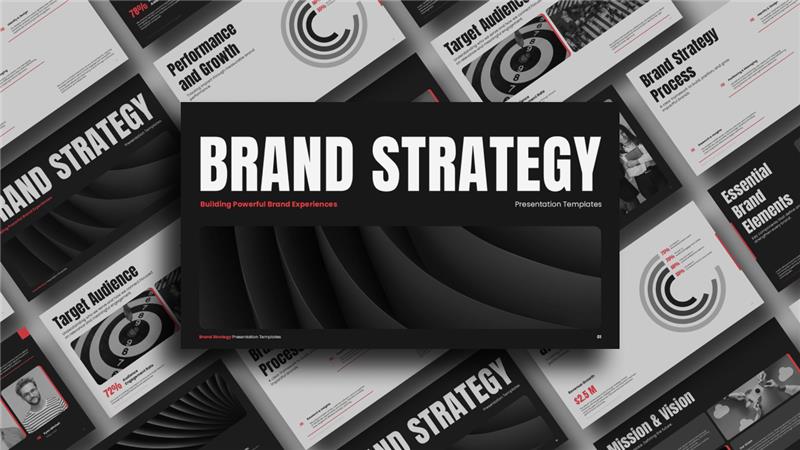
VIEW HERE: Brand Strategy Presentation Template
Build a strong brand identity and communicate your marketing vision with this Brand Strategy Presentation Template. Featuring a bold black-and-white design with modern layouts and striking typography, this template helps you present brand positioning, target audience analysis, brand identity, mission and vision, essential brand elements, and performance strategies. It’s ideal for marketing professionals, branding agencies, business consultants, and entrepreneurs who want to develop or present a brand strategy. Customize the text, charts, visuals, and design elements to showcase your brand ideas and create a professional presentation.
Business Executive Summary Template
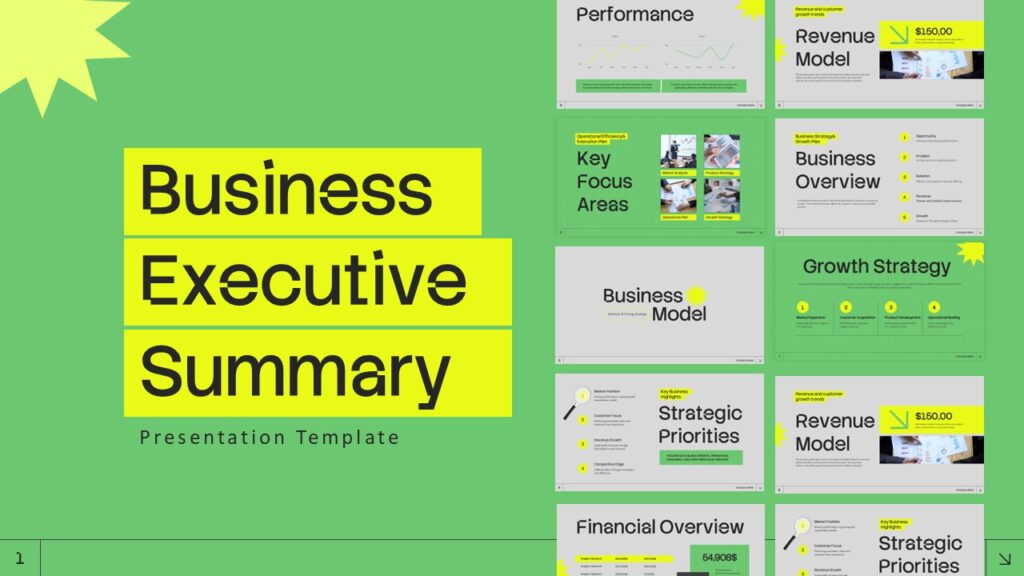
VIEW HERE: Business Executive Summary Template
Present your business plans, key objectives, financial performance, and strategic priorities with this Business Executive Summary Template. Featuring a fresh green-and-lime color palette, clean layouts, and modern infographic elements, this template helps you communicate important business information in a clear and organized format. It includes slides for business overviews, revenue models, key focus areas, growth strategies, strategic priorities, and financial performance. It’s ideal for business executives, entrepreneurs, consultants, and management teams who want to summarize business performance, present strategic plans, and communicate important decisions effectively.
Financial Report Presentation Template

VIEW HERE: Financial Report Template
Present financial performance, budgets, revenue forecasts, and business insights with this Financial Report Presentation Template. Featuring a professional dark navy, white, and green color scheme, this template combines clean layouts, data visualizations, charts, and financial dashboards to make complex financial information easier to understand. It includes slides for financial report introductions, budget performance, revenue projections, financial highlights, expense analysis, and business performance metrics. Ideal for finance professionals, accountants, business executives, and management teams who want to present financial results, review budgets, and communicate financial insights effectively. Compatible with PowerPoint and Google Slides.
ESG Report Presentation Template
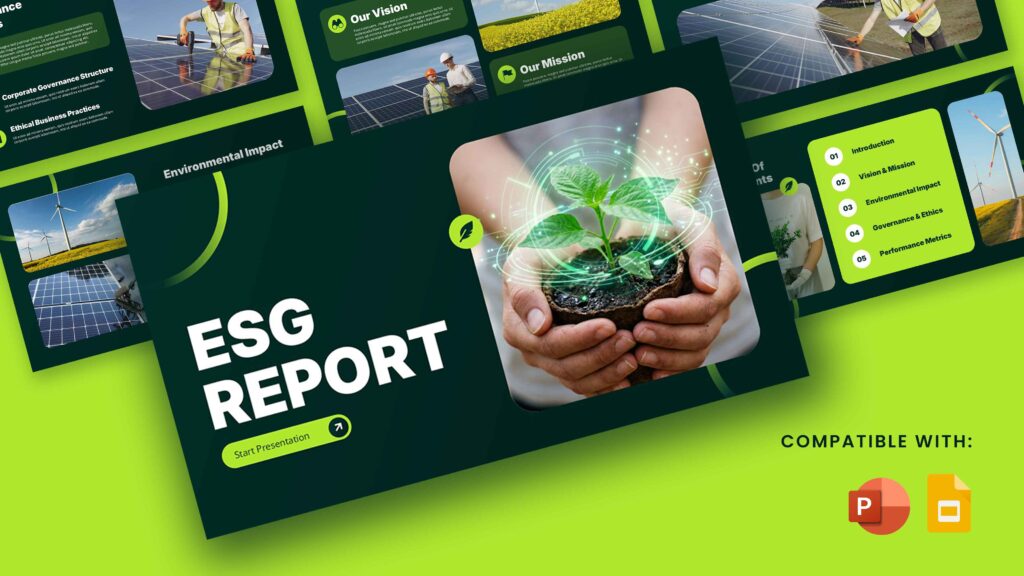
VIEW HERE : ESG Report Template
Communicate your organization’s environmental, social, and governance initiatives with this ESG Report Presentation Template. Featuring a dark green and vibrant lime color palette, modern layouts, and sustainability-focused visuals, this template helps you present ESG goals, environmental impact, corporate governance, and sustainability performance. It includes slides for company vision and mission, environmental initiatives, governance practices, performance metrics, and sustainability reporting. Ideal for business executives, sustainability professionals, consultants, and corporate teams who want to showcase ESG strategies, report sustainability progress, and communicate their organization’s commitment to responsible business practices. Compatible with PowerPoint and Google Slides.
What Makes a Great Business Presentation in the Age of AI?
With AI tools becoming part of our everyday workflow, creating slides is no longer the biggest challenge. The real challenge is creating presentations that communicate ideas clearly, capture attention, and leave a lasting impression. We can generate dozens of slides within minutes, but a successful presentation still depends on how well we understand our subject and connect with our audience.
So, what separates a great business presentation from an ordinary AI-generated slide deck? Here are five things we should focus on.
1. Original Ideas and Creative Thinking
A great presentation should communicate something meaningful rather than repeat generic information. We should bring our own knowledge, experiences, research, and business insights into the slides. Use AI to explore ideas, but develop your own perspective and creative direction.
2. Clear and Meaningful Storytelling
Every presentation should have a purpose and a logical flow. Start with the main idea, support it with relevant information, and guide the audience towards a clear conclusion. Make sure every slide connects with the next and contributes to the overall message.
3. Professional Visual Design
Good design makes information easier to understand. Choose appropriate layouts, typography, colors, images, charts, and illustrations. Avoid overcrowding slides with unnecessary text or decorative elements. Maintain visual consistency while giving important information enough space to stand out.
4. Accurate Information and Relevant Data
A professional presentation should always provide reliable information. Verify statistics, research findings, financial figures, and business claims before including them. Use relevant charts, graphs, and infographics to explain important information rather than relying on unsupported statements.
5. Strong Presenter-Audience Connection
The slides should support the presenter, not replace them. Understand your audience, explain ideas naturally, use relevant examples, and encourage interaction whenever possible. A confident presenter who understands the subject can make even a simple presentation more engaging and memorable.
Ultimately, a great business presentation combines strong ideas, meaningful content, thoughtful design, and effective communication. AI can help us improve the creation process, but these qualities are what make people pay attention, understand our message, and remember what we present.
The Future of Business Presentations: Will AI Replace Human Creativity?
AI is changing the way we create presentations, and these tools will continue to become more advanced. We can already generate complete slide decks, create custom visuals, summarize research, and improve content with just a few prompts. As these capabilities grow, we may see even more automation in presentation design. But does that mean AI will eventually replace human creativity?
I don’t think the future of presentations is about choosing between AI and human creativity. It’s about finding the right balance between the two. AI can handle repetitive tasks, suggest design ideas, and speed up the creation process, but we still need human judgment to understand the audience, develop original concepts, and communicate meaningful ideas.
Here are a few things that will continue to shape the future of business presentations.
1. AI Will Make Presentation Creation Faster
AI tools will continue to simplify research, content writing, slide formatting, and visual creation. We will be able to prepare presentations more quickly and spend less time on repetitive tasks. However, faster creation will make it even more important to review and refine the final output.
2. Originality Will Become More Important
As more people use similar AI tools, creating something different will become a valuable skill. Businesses will need presentations that reflect their unique identity, ideas, and communication style rather than relying on predictable layouts and generic content.
3. Storytelling Will Remain a Human Strength
AI can organize information and suggest a logical presentation structure, but meaningful storytelling requires an understanding of people, context, and emotions. We need to know which ideas matter to our audience and how to communicate them in a way they can understand and remember.
4. Presentation Design Skills Will Continue to Matter
Even when AI automates slide creation, we will still need to understand visual hierarchy, typography, color combinations, layouts, and information organization. These skills help us identify what works, improve generated designs, and create presentations that communicate effectively.
5. Human Judgment Will Define Presentation Quality
AI can generate slides, but we must decide whether the content is accurate, the visuals are relevant, and the message makes sense. Our ability to review information, make creative decisions, and understand business requirements will remain essential.
The future belongs to people who know how to use AI without depending entirely on it. We should embrace new tools, experiment with their capabilities, and use them to improve our workflow. But we should never stop developing our own creative thinking and presentation skills. After all, the purpose of a business presentation will remain the same: to communicate ideas, influence decisions, and connect with people.
Final Thoughts: Let AI Assist Your Presentation, Not Define It
AI has made creating business presentations faster and easier, but we shouldn’t let it replace our creativity, ideas, and storytelling. Use AI to save time, improve content, and simplify repetitive tasks, but take control of the design, message, and final presentation.
A great presentation isn’t about how quickly we generate slides; it’s about how effectively we communicate our ideas.
Looking for professional designs? Explore SlideChef’s PowerPoint and Google Slides templates to create engaging business presentations without starting from scratch.
Let AI assist your work, but let your creativity make your presentations stand out.
About The Author





Related Blogs