Table of Contents
How to Write a Effective Weekly Report (Best Practices, Formatting & Templates)
Best Practices to Create a Weekly Report
Writing a weekly status report often feels like a tedious administrative chore that pulls you away from the actual work you are trying to report on. Staring at a blank document on a Friday afternoon, trying to condense 40 hours of effort into a digestible update, is a frustration most professionals know too well. However, keeping leadership and your team aligned does not have to be a massive time sink.
In this ”How to write a effective weekly report” guide, we break down the core components of a highly effective status update and walk you through a step-by-step writing framework that stakeholders actually want to read. To help you eliminate the friction entirely, we also provide plug-and-play presentation templates. By standardizing your layout, you can save hours of design and formatting time every week, allowing you to showcase your milestones faster and smarter.
What is a Weekly Status Report?
While the core structure of a weekly update remains consistent, the specific focus of the document should adapt to its intended audience and purpose. Not all stakeholders require the same level of granularity, meaning a one-size-fits-all approach often leads to either missing details or information overload. Tailoring the type of report you use ensures that managers, cross-functional teams, or executives receive exactly the data they need to make informed decisions. By categorizing your updates based on the department or project scope, you can streamline communication and eliminate unnecessary fluff. Ultimately, selecting the correct report type transforms a generic update into a powerful, targeted tool for business alignment.
Here are the most common types of weekly reports you might need to write:
- Individual Progress Reports: Focuses on a single employee’s daily tasks, personal milestones, and immediate roadblocks, making it ideal for one-on-one manager check-ins.
- Project Status Reports: Centers on a specific initiative or campaign, tracking timelines, cross-functional deliverables, and overall project health against the original scope.
- Departmental & KPI Reports: Highly quantitative updates used by teams like marketing, sales, or finance to track weekly metrics, revenue numbers, and performance against quarterly goals.
- Executive Summaries: High-level, visually driven overviews designed for C-suite leadership, focusing exclusively on major wins, budget impacts, and critical strategic decisions rather than granular day-to-day tasks.
What Should Be Included in a Weekly Report?
Before diving into specific templates, it is crucial to understand the anatomy of a standard status update. To ensure your document is effective, skimmable, and valuable to leadership, every weekly report should include these six core components:
Title, Date, and Owner
Start with the basics. While it may seem obvious, clearly labeling your document is essential for chronological record-keeping and easy retrieval. Always include the project or department name, the specific date range (e.g., October 5 – October 9), and the name of the person responsible for the report. This ensures stakeholders immediately know exactly what and who they are reviewing.
The Executive Summary
This is a one-paragraph, high-level overview of the overall project health. Executives and managers often skim reports, so this section must distill the most critical information into just three or four sentences. Highlight major wins, significant metric shifts, or critical alerts. If a stakeholder reads nothing else on the page, they should still walk away understanding the week’s bottom line.
The Past (Completed Tasks)
What did you actually get done this week? List the specific deliverables, milestones, and tasks that were successfully finished. Use bullet points to maintain skimmability and keep your descriptions brief. Instead of just listing daily activities, focus on the actual outcomes and value delivered.
The Present (In-Progress Goals)
Highlight active initiatives that are currently moving forward but are not yet complete. This section is the ideal place for metric tracking and updating Key Performance Indicators (KPIs). Clearly state the status of ongoing projects (e.g., “Phase 2 is 60% complete”) to assure management that longer-term goals are progressing smoothly on schedule.
Roadblocks (Challenges & Solutions)
Transparency is a critical element of any status update. Use this section to identify any bottlenecks, resource shortages, or delays hindering your progress. However, a best practice is to never present a problem without also offering a solution. Pair every challenge with a proposed mitigation plan or a specific request for support from management.
The Future (Action Items)
What is next on the agenda? Outline your prioritized tasks and new initiatives for the upcoming week. Documenting your future action items sets clear expectations for your next report and ensures that your immediate focus remains perfectly aligned with the broader goals of your team or company.
The Best Weekly Report Templates
While a standard text document might suffice for a personal checklist, dense paragraphs are rarely effective for executive summaries or team meetings. Leadership teams and cross-functional partners need to digest data quickly, making visual, slide-based reports significantly more impactful than a wall of text. Instead of building layouts from scratch every Friday, you can leverage SlideChef’s premium presentation templates to transform your raw updates into a polished, professional deck in minutes. These ready-made designs allow you to focus entirely on your content, ensuring your weekly reports are both highly skimmable and visually compelling.
Morning Meeting Report Deck Template
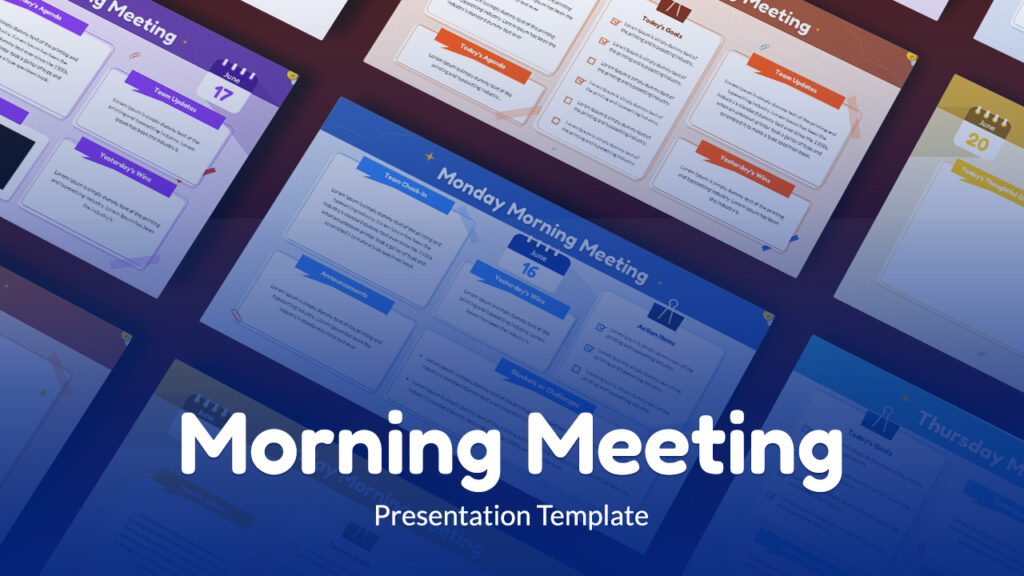
SlideChef’s Morning Meeting Report Deck Template is an ideal solution for teams that manage their weekly progress through daily stand-ups. This deck includes 11 fully customizable slides covering status updates from Monday through Friday, along with dedicated note slides for each day’s check-in. The daily slides feature organized, color-coded sections for tracking “Today’s Goals,” “Yesterday’s Wins,” and general team updates. To keep meetings engaging, the layout also provides specific placeholders for video messages and daily check-in slides with sections for “Today’s Thoughtful Question” and team notes. This highly versatile template is available for immediate use in PowerPoint, Google Slides, and Canva.
Weekly Activity Report Template

The SlideChef Daily Meeting Agenda Template is designed for teams that build their weekly progress reports by aggregating daily check-ins. Featuring a professional dark blue and mustard yellow color palette, this deck provides clean, structured layouts for outlining tasks. The template includes versatile slide designs, such as numbered agenda overviews and detailed text lists specifically formatted for tracking “Morning Work”. It also features dedicated slides for planning specific days, such as a “Day 04” layout, allowing for a chronological breakdown of the week. To maintain team engagement during morning briefings, the deck incorporates team member profile slides and a distinct layout section for sharing a “Fun Fact Of the day.”
Multiple Project Status Report Template by SlidesDepot
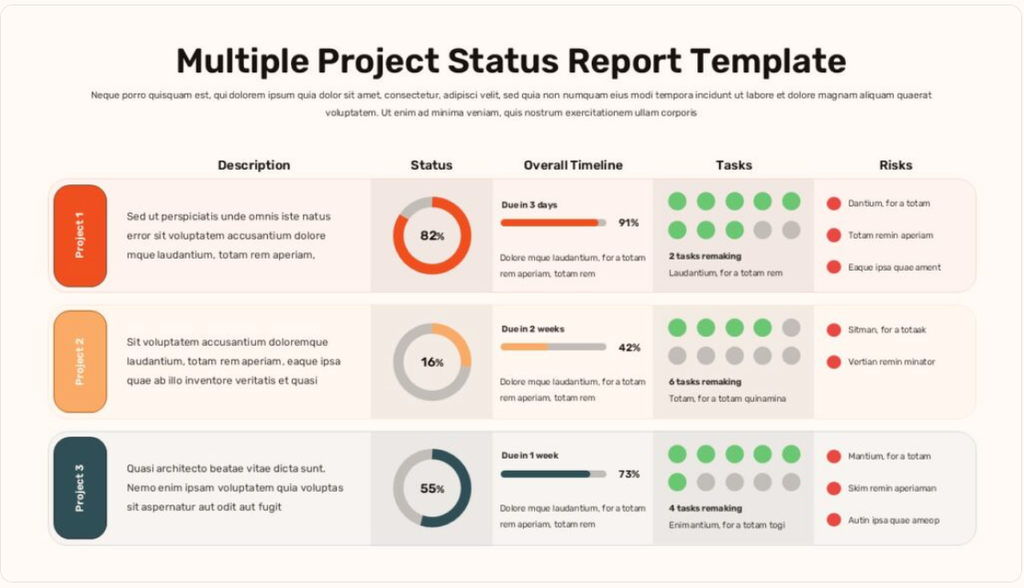
For managers and team leads juggling concurrent initiatives, the Multiple Project Status Report Template by Slidesdepot is a highly efficient solution. This slide features a clean, dashboard-style layout designed to track multiple projects side-by-side at a single glance. Each color-coded row breaks down critical project data across five distinct columns: a brief Description, a Status indicator utilizing percentage-based donut charts, an Overall Timeline featuring progress bars and upcoming deadlines (e.g., “Due in 3 days”), a visual Tasks tracker using green and grey dot indicators, and a dedicated Risks section with red warning bullets to highlight potential roadblocks. This data-rich format is perfect for executive summaries, allowing leadership to quickly assess the health of an entire portfolio without getting bogged down in granular details.
Virtual Weekly Status Report by Slidesgo
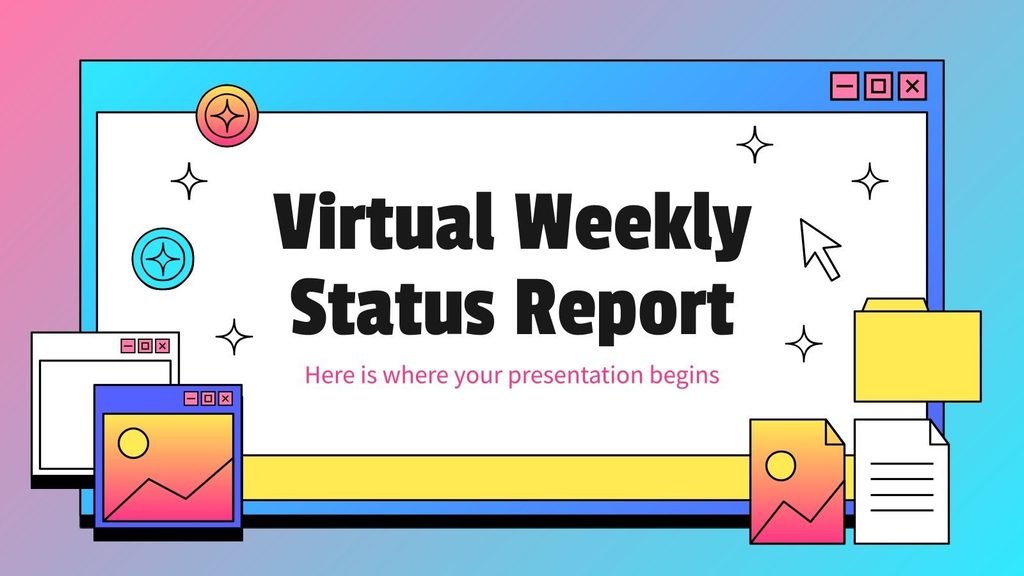
If you are looking to inject some personality into your remote team check-ins, the Virtual Weekly Status Report template by Slidesgo is a fantastic choice. Stepping away from traditional, rigid corporate designs, this deck embraces a nostalgic, retro computer aesthetic. It features classic 90s-style UI window frames, vibrant pastel pink and blue gradient backgrounds, and pixelated desktop icons like file folders, hourglasses, and cursors. Despite its highly playful and creative appearance, it remains perfectly structured for professional reporting. The deck includes neatly organized layouts with pre-built sections for tracking essential updates, including “Project status,” “Goals,” “Schedule,” “Scope,” “Project risks,” and “Key initiatives.” It is an engaging way to present routine data and keep virtual teams actively paying attention.
Simple Weekly Project Status Report by Slidekit
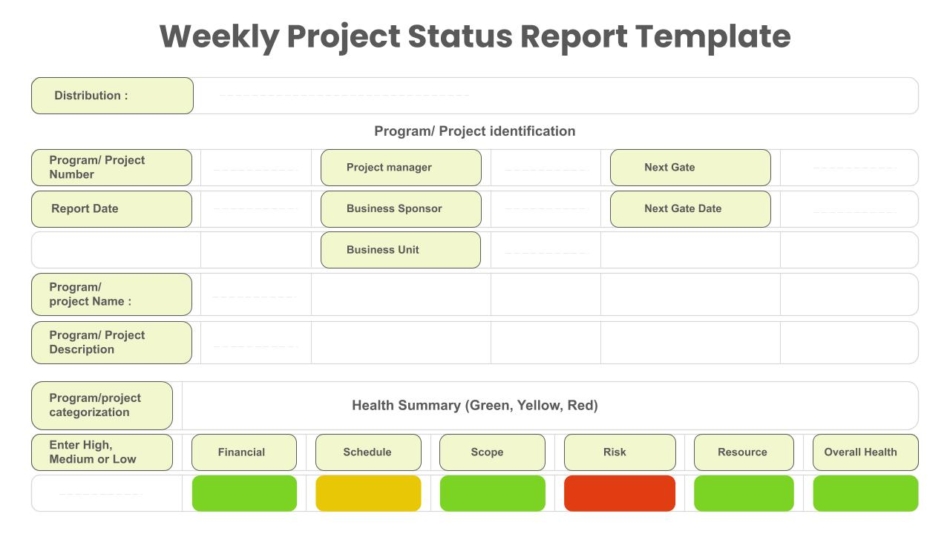
If your organization requires a highly formal, traditional approach to project management, the Simple Weekly Project Status Report by Slidekit is an excellent choice. This template utilizes a structured, form-like grid layout that captures the comprehensive detail of a spreadsheet directly within a presentation slide. It features extensive text fields for formal record-keeping, including specific sections for “Program/ Project identification,” “Business Sponsor,” “Business Unit,” and “Next Gate Date”. The standout feature of this layout is the “Health Summary” section positioned at the bottom, which utilizes a classic RAG (Red, Yellow, Green) color-coding system. By breaking down the project’s status into individual categories—Financial, Schedule, Scope, Risk, and Resource—this visual tracker allows stakeholders to instantly identify which specific areas are on track and which represent active risks.
How Do You Write a Weekly Report? (Step-by-Step Guide)
Writing an effective weekly report is about establishing a repeatable, efficient workflow rather than starting with a blank page every Friday. Follow these five steps to draft a clear, comprehensive status update in record time:
- Gather your quantitative data first: Before writing any text, collect your hard numbers. Pull your latest KPIs, analytics, budget spending, or project completion percentages so you can ground your update in factual data rather than vague estimates.
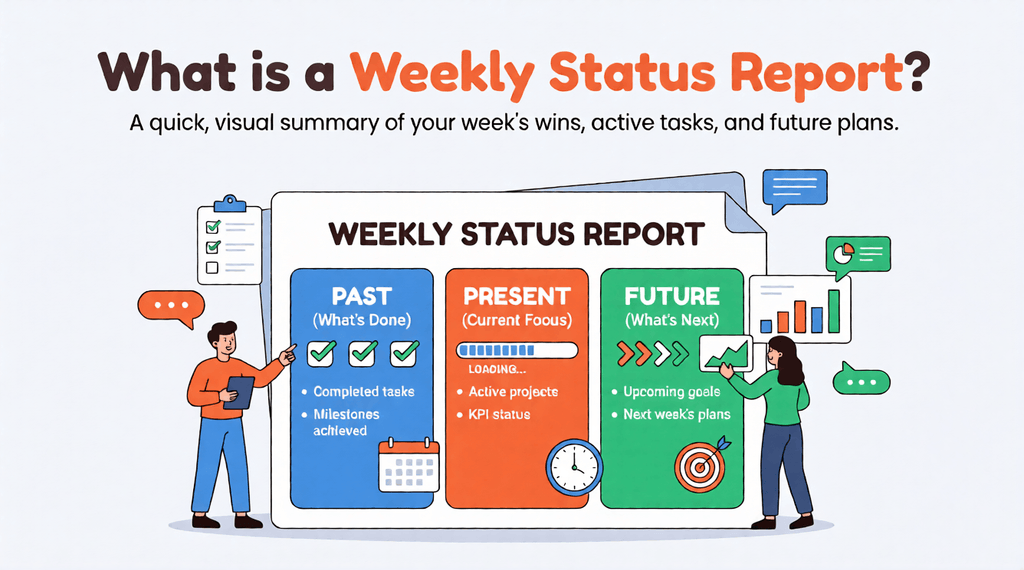
- Write the “Past, Present, and Future” bullet points: Break your core update into three distinct sections. List out the major deliverables you completed last week (the past), the active initiatives you are currently working on (the present), and the prioritized tasks you will tackle next week (the future).
- Frame challenges neutrally and propose solutions: When documenting roadblocks, avoid sounding defensive or overly negative. State the bottleneck objectively (e.g., “Design approval is delayed by two days”) and immediately pair it with an actionable mitigation plan or a specific request for management support.
- Draft the executive summary last: Wait until you have compiled all your data and task updates before writing your introductory paragraph. This ensures your high-level overview accurately reflects the most important themes and metrics detailed in the body of the report.
- Drop the content into a pre-formatted template: Do not waste time adjusting margins or building tables from scratch. Plug your finalized text into a ready-made presentation template to instantly format the information for maximum skimmability and visual impact.
What Are the Best Practices for Writing Effective Reports?
Even with the perfect structure and a beautiful template, the way you deliver your information determines whether your report is actually read or immediately archived. To maximize the impact of your weekly updates and build trust with leadership, keep these core best practices in mind:
- Keep It Concise (The One-Page Rule): A status report is an executive summary, not a daily diary. Respect your stakeholders’ time by strictly limiting your update to a single page or a maximum of one to two highly visual slides. If a specific roadblock or project milestone requires a deep dive, schedule a dedicated meeting rather than burying paragraphs of text in a weekly update.
- Eliminate Industry Jargon: Remember that your report may be forwarded to cross-departmental partners, external clients, or executives who do not share your daily technical vocabulary. Strip out complex acronyms and department-specific jargon. Write in plain, accessible language so anyone outside your immediate team can instantly understand your progress and challenges.
- Turn Data Into Decisions: Never present raw numbers without context. Simply listing metrics forces management to guess why those numbers matter. Instead, add a brief interpretation of the data and pair it with an action plan. For example, instead of just writing “Website traffic dropped 10%,” write: “Traffic dropped 10% this week; therefore, we are auditing our site indexation and adjusting our content strategy.” Always frame your metrics around actionable next steps.
Start Reporting Smarter, Not Harder
A well-structured weekly report should never be a source of Friday afternoon stress. When executed correctly, it is a powerful communication tool that builds trust with leadership, aligns cross-functional teams, and keeps complex projects moving forward on schedule. By sticking to the core components of the past, present, and future framework—and ensuring your updates remain concise and action-oriented—you can deliver high-impact insights without draining your own productivity.
The absolute easiest way to optimize your workflow is to stop building your documents from scratch every single week. Instead of wrestling with margins and text boxes, let your milestones stand out with a professional, presentation-ready layout. Download SlideChef’s ready-made weekly report templates today to save hours of design time, impress your stakeholders, and make your next status update visually striking and incredibly fast.
About The Author





Related Blogs